Our substance is short yet to the point, and intended to challenge you to live in and nurture with IT technologies. @http://thecorlissreviewgroup.com

Sunday, June 1, 2014

The Corliss Group Latest Tech Review: Google Glass News on Do’s & Don’ts’ & Wearable Gadget Etiquette


Google Glass News: Restaurant Bans Mêlée With Online Reviews From Glassholes, Reports Highlight ‘Do’s & Don’ts’ & Wearable Gadget Etiquette

Google Glass news reports say that fans of the computing headgear wearable are fighting the ban on the wearable gadget in restaurants.

The ban comes on the heels of an anti-Google Glass incident in a San Francisco bar just months ago.

Mashable reports that Google Glass enthusiasts are fighting back when asked to remove their Glass at restaurants. How? By writing awful reviews of the restaurants:

It all started in April when Google Glass user Katy Kasmai was asked to remove her device at a restaurant called Feast in New York City. Instead of complying with the request, she decided to leave. But soon after, Kasmai posted a one-star review of the restaurant, setting off the latest in a series of public debates about Glass."

Reports have also found that 72% of Americans do not wish to own Google Glass over privacy concerns. It's clear that the Glass has the general public edgy over the probability of being videotaped or photographed candidly.

Apart from the review of the Feast, Kasmai posted, "Feast, in #NYC just asked that I remove +Google Glass because customers have complained of privacy concerns," adding, "Never has happened to me before in the one year I've had Glass."

Following the post was a number of other reviewers giving the restaurant a poor review for the same issue.

 Feast's manager told to EV Grieve "It's malicious and technically a violation of Google's own terms for leaving reviews, adding, ""I can understand her leaving the one-star based on her experience, but 12 others with no experience on who we are or what we do is unfair."

Gothamist.com underscored Google's own regulations about the 'etiquette of Google Glass', the Do's and Don'ts, if you will:

"Don't be creepy or rude (aka, a "Glasshole"). Respect others and if they have questions about Glass don't get snappy. Be polite and explain what Glass does and remember, a quick demo can go a long way. In places where cell phone cameras aren't allowed, the same rules will apply to Glass. If you're asked to turn your phone off, turn Glass off as well. Breaking the rules or being rude will not get businesses excited about Glass and will ruin it for other Explorers."

Nonetheless, Google Glass remains a highly polarized gadget with some really liking it and others not liking at all. It looks it will take more time for the privacy issue to go away or Google might have to make some tweaks like sounds and lights that signal when the wearable is engaging with 'people on the outside.'

Earlier there had been rumors that Google Glass is on sale for every U.S. citizen to buy for a whopping $1500.

According to Tech Crunch, the Google Glass store is open and is taking orders, but Google is letting consumers know this is not a public launch of Google Glass for anyone who has $1500 to spend on tech wearables. Oh, and that figure is not inclusive of tax.

One Google spokesperson commented that the Google Glass store is set up to enable participants of the April 15 sale to complete their buys. So, that also means you can't just walk into the Glass store and get hold of  'Glass.'

Google also released a statement saying, the link was created to enable recent Explorers who signed up for the gadget from last week's sale. The search engine giant also said that it would be shuttering down  the facility in order to continue experimenting with the expansion of the Explorer program in the future, implying Glass is still in nascent phase.

There are no plans for Google to continue selling the gadget again, say reports.

Friday, May 30, 2014

Finally, fitness trackers measure up by The Corliss Group Latest Tech Review


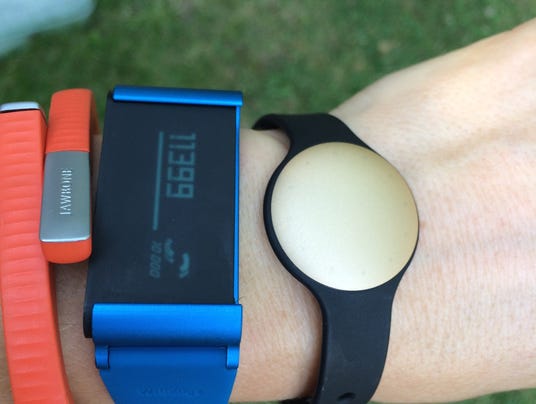
There's a lot to love about the latest round of lifestyle tracking bands. The Jawbone UP24 is super simple and massively motivational. The newWithings Pulse O2 gives other bands serious screen-envy. And Shine, by Misfit Wearables, is a whole lot more than a pretty face. If you could put all three of these gadgets together with the Moves andMap My Run Apps, I would love it so much I would want to marry it.

I'm only half joking.

As standalones, each new fitness tracker has a few points to brag about, as well as a few weaknesses. Together, they've totally stepped up their game toward getting you more healthy. They are (finally!) so much more than glorified pedometers. If you've been eyeing these little lifestyle trackers, it could very well be time to buy. So now, let's figure out which one might be the right fit for you.

JAWBONE UP24

The Jawbone UP24 is the right band for the mainstream masses. It's the easiest of these three to just slap on and go. You wear the thin little band around your wrist, and it records roughly how many steps you take each day, how much and how well you sleep at night, and — if you log your meals into the companion app on your smartphone — your calories and nutrition information as well.

Gathering all that information is one thing, but the real value here is in how well Jawbone's smartphone app presents the important details back to you. The app layout is super simple, intuitive, and gives all the information you need with one glance.

You open it up and see three main bars which tell you how much you slept last night, how many steps you've taken today, and potentially (if you log) how many calories you've eaten. There are also motivational notes tailored for you, as well as your past data and overall trends.

You can connect with friends via social media and see how your progress stacks up against theirs, which is a great boost for accountability. You can also set reminders and goals within the app, so that the band vibrates if you've been sitting still too long or need a reminder to make an exercise class.

The biggest weakness with Jawbone's UP24 is that there's no display on the actual wristband itself, which keeps you tethered to your smartphone to check your progress throughout the day. There's a little flower that lights up if you've set a reminder, and a little moon to denote that you're in sleep mode, but that's it. If I'm wearing this thing around my wrist all the time, I at least want to be able to see what time it is.

Who it's great for: Casual fitness fans, desk jockeys, and anyone getting started with a slightly more structured health routine. You do not need to be tech-savvy to use it. With 7-day battery life and the flexible app, the Jawbone UP24 lets you tweak your own personal approach to fitness, and it's not as demanding as many of the alternatives. You can pick one up for $149.99.

SHINE

The Shine disc-tracker is about the size of a quarter and pretty enough to wear as a piece of jewelry. Like the Jawbone, the tiny Shine sensor keeps track of movement, including steps, sleep and food, and automatically syncs up with a smartphone app. But unlike the alternatives, Shine is waterproof, has an internal battery that lasts up to a year (vs. having to charge it up once a week) and can virtually disappear within your daily wardrobe.

Simply snap the tiny gadget onto a lapel or sleeve, or wear it as a piece of jewelry with one of the dozens of flashy fashion accessories available. With the built-in LEDs that show the current time, you can even wear it as an ultra-modern, eye-catching watch. When it's time to tally your daily accomplishments, simply sync the sensor on your smartphone screen and watch the Shine app record it all.

Shine's app also does an excellent job of translating your goals into real actions. For instance, if you want to lose a pound a week, the app crunches numbers with your height, weight, and age, and tells you what actions will get you there — like walking for 2.5 hours per day or running for one hour. As your day goes on, you earn points on your progress, and LED lights on the tracker also light up as you closer to your goal.

Who it's great for: Fitness fashionistas, workaholics, early-adopters, the moderately tech-savvy, and anyone who wants a low-key activity tracker without the world knowing you're wearing it. The Shine sensor costs $119.95, with optional accessories that range from $19.95 to $79.95. Continue reading…

For more info about Corliss Group Latest Tech Review, visit our facebook page and follow us on twitter @CorlissTech.

Wednesday, May 28, 2014

The Corliss Group Latest Tech Review: Samsung Galaxy Note 4 Features and Launch Date Tipped


Samsung Galaxy Note 3 successor is in the news again, with two different reports tipping its features and launch date.

Sammobile claims that Samsung is testing features like 'Swipe to launch Motion Launcher', 'Aqua Capture', 'Multi Network for Booster', and 'Smart Fingerprint' for the Galaxy Note 4.

Aqua Capture resembles the Aqua Mode seen in Galaxy S4 Active handset that would enable users to click images underwater. This hints the Galaxy Note 4 will be more water-resistant than the Galaxy S5(Review | Pictures).

Swipe to Launch Motion Launcher is another feature under testing that is said to be similar to Motion Launch seen on the HTC One (M8) (Review | Pictures). HTC's Motion Launcher lets users activate camera, wake up the device and do other tasks just by swiping in different directions on the screen.

Smart Fingerprint, as the name suggests, is said to be the modified version of the fingerprint sensor included in the Galaxy S5 smartphone, with additional capabilities. Multi Network for Booster is likely the same as the Download Booster feature on the Galaxy S5, which combines a Wi-Fi and cellular data connection, the report notes.

Android GS, via an insider from Samsung, adds that the alleged Samsung Galaxy Note 4 phablet could be announced on September 3. The date isn't surprising given that the Samsung Galaxy Note 3was launched on September 4.The report adds that the Korean smartphone maker will start sending invites for the event around mid-August.

Some of the rumoured specifications of the Galaxy Note 4 that surfaced earlier include 2K display (1440x2560); 64-bit processor; 4GB RAM; 20.7-megapixel rear-facing camera; 4G and dual-band Wi-Fi support, and 3600 or 3800mAh battery. Additionally, the Galaxy Note 4 is  expected to come with Android 4.5, as well as a 128GB internal storage variant.

The device is also rumoured to sport the much-awaited flexible display technology by Samsung, tipped the Youm flexible OLED display.

For more info about Corliss Group Latest Tech Review, visit our facebook page and follow us on twitter @ CorlissTech.


Tuesday, May 27, 2014

The Corliss Group Latest Tech Review on the Best Antivirus for 2014

It's easy to feel overwhelmed by all the Heartbleed and NSA-spying stories in the news. But there's still a lot you can do to keep your computer safe. The first thing? Install antivirus software.


With all the NSA, Edward Snowden, and Heartbleed stories in the news, security is arguably the tech story of the year. But while these big glitzy stories are grabbing most of the attention, the most important thing you, the consumer, can do, is to perform the decidedly unglamorous but vital task of securing your own machines. And that means antivirus. All the big players have got 2014 edition products out, and some are even starting to ship 2015 editions! Many of the latest versions have morphed their appearance to match the Windows 8 style, tile-based and touch-friendly. Others remain unchanged, perhaps hoping to attract users by keeping the same familiar face.

Whether they look the same or not, most of the same products retain their positions at the top of the heap. Here are the best from the current crop of antivirus products.

With all the NSA, Edward Snowden, and Heartbleed stories in the news, security is arguably the tech story of the year. But while these big glitzy stories are grabbing most of the attention, the most important thing you, the consumer, can do, is to perform the decidedly unglamorous but vital task of securing your own machines. And that means antivirus. All the big players have got 2014 edition products out, and some are even starting to ship 2015 editions! Many of the latest versions have morphed their appearance to match the Windows 8 style, tile-based and touch-friendly. Others remain unchanged, perhaps hoping to attract users by keeping the same familiar face.

Whether they look the same or not, most of the same products retain their positions at the top of the heap. Here are the best from the current crop of antivirus products. See here…

Independent Lab Tests

I spend hours or days with every product performing hands-on testing, but the independent antivirus labs have whole squads of researchers for even more in-depth testing. I follow a half-dozen labs that perform ongoing tests and that make their results public: AV-Test, AV-Comparatives, Dennis Technology Labs, ICSA Labs, Virus Bulletin, and West Coast Labs.

I take independent testing quite seriously, and I recently worked up a new systemto evaluate each product in light of its lab results. I've identified five important categories: detection, cleaning, protection, false positives, and performance. When there's enough data from the labs, I use it to calculate a star rating in each category, and an overall rating.


As you can see in the chart below, Kaspersky and Bitdefender get really excellent scores across the board. That's certainly a good sign. Note that while Microsoft Security Essentials appears in the chart, most of the labs treat it as a baseline, not as a serious contender. Microsoft agrees; they're not trying to compete with the third-party vendors. They just want to make sure everyone has some degree of protection.

Even the independent labs don't have unlimited resources, so there's a dearth of results for some products. I'll be talking with some of the more flexible labs about the possibility of expanding the collection of products they test.

The cloud-based behavioral monitoring of Webroot SecureAnywhere Antivirus (2014)$19.99 at Webroot is wildly different from almost any other product, and it's just not compatible with many test setups. As a result, it hardly gets tested at all. That's a shame, because it's amazingly tiny and scans amazingly fast.


For a detailed description of the lab tests that I follow and of the way I summarize them into a chart like the one below, please see How We Interpret Antivirus Lab Tests. Continue reading…

Monday, May 26, 2014

Your MasterCard Suspended for Fraud? It's a Scam by The Corliss Group Latest Tech Review


Scammers are calling unsuspecting consumers on the telephone to steal credit card numbers. If you get such a call, just hang up and do not engage.

Cyber-criminals employ various tools and techniques to launch their scams, including malware, hacked websites, and bots. They also like social engineering, because it is so effective. When you get an email from a friend stranded in a foreign country needing some money to get home, your first instinct is to help. When you are surfing the Web and you suddenly see a pop-up window telling you your computer has been infected, you get nervous at the prospect of losing all your important files. And when someone calls your phone claiming you—or your loved ones—are about to be arrested because of overdue taxes, it's hard not to panic.

Let's face it, fear sells.

"Probably the best way to react is to relax first.  High pressure situations are exactly how social engineers get you to react too quickly," Robert Hansen, head of WhiteHat Labs at WhiteHat Security, told SecurityWatch in an earlier conversation about phishing scams.

Give Me Your Card Number

In this scam, I received a call over the weekend on my cell phone informing me my prepaid MasterCard had been suspended due to fraud. I pressed "1 to unlock the card," and was told to enter my 16-digit card number. Sadly, I didn't have a spare prepaid MasterCard (I keep a few on hand for testing purposes) handy, so I couldn't continue. It was pretty clear by this point that this was a scam, since I don't have a prepaid MasterCard.

A less paranoid—and more trusting consumer—may have thought, oh, maybe the caller means my regular MasterCard. Here is a tip: If an automated system calls asking for your card information, it's probably a scam. Don't disclose card numbers or other account information during these types of calls.

I got another call this morning, at way-too-early 6 AM, where a computerized voice said, "This is an official notification from NetSpend.  Your prepaid MasterCard has been locked due to suspicious activity.  Press one to unlock it." I still didn't have a test card, so when I got to the point where it needed my card number, I pressed 0 and a few other keys to see if I could get a human on the line. The call didn't sound like a recorded message, but rather that the caller was using text-to-speech software.

Another tip: if you don't have a prepaid card, don't put in your debit card info. If you never use your debit card and get a call about a problem with the card, be skeptical. Even if you do use the card, hang up and just call the financial institution directly.

No human operator ever answered, so I hung up. I went out and got a card this afternoon, to be ready for the next call. I am actually looking forward to this.

How the Scam Works

A quick search on ripoff.com, bbb.org, and other consumer advocacy sites show a handful of complaints from earlier this month from users who received similar calls. The format of the call differs slightly, and the bank name changes, but in general the recipient is directed to "press 1" to fix the issues with their card, and then to hand over information such as the card number and PIN, and sometimes even the expiration date and security code.

Scammers are calling to get your card information and PIN so they can withdraw money from the account. The proper response is to hang up, call the bank or financial institution directly, and verify their information is secure.

My caller ID showed the call from 10000000000, which would indicate the caller was spoofing a call over VoIP. According to forum postings on 800notes.com, the scam uses a variety of numbers, with area codes such as 223 and 323. It's not clear how the caller got my number. It could have been random, or it could have been bought off mailing lists or hacked from a database.

Protect your information. If you get a call asking you to enter your card number—no matter what the reason is—just hang up and call your bank directly. Don't finance the criminal's shopping spree.


For more info about Corliss Group Latest Tech Review, visit our facebook page and follow us on twitter @ CorlissTech. 

Sunday, May 25, 2014

The Corliss Group Latest Tech Review: The Internet Is Burning


Online security is a horrifying nightmare. Heartbleed. Target. Apple. Linux. Microsoft. Yahoo.eBay. X.509.  Whatever security cataclysm erupts next, probably in weeks or even days. We seem to be trapped in a vicious cycle of cascading security disasters that just keep getting worse.

Why? Well — “Computers have gotten incredibly complex, while people have remained the same gray mud with pretensions of godhood … Because of all this, security is terrible … People, as well, are broken … Everyone fails to use software correctly,” writes the great Quinn Norton in a bleak piece in Medium. “We are building the most important technologies for the global economy on shockingly underfunded infrastructure. We are truly living through Code in the Age of Cholera,” concurs security legend Dan Kaminsky.

Most of which is objectively true. And it’s probably also true, as Norton states and Kaminsky implies, that a certain amount of insecurity is the natural state of affairs in any system so complex.

But I contend that things are much worse than they actually need to be, and, further, that the entire industry has developed learned helplessness towards software security. We have been conditioned to just accept that security is a complete debacle and always will be, so the risk of being hacked and/or a 0-day popping up in your critical code is just a random, uncontrollable cost of doing business, like the risk of setting up shop in the Bay Area knowing that the Big One could hit any day.

What’s more, while this is not actually true, most of the time it is no bad thing.


I’m pleased that I was a Heartbleed hipster, dissing OpenSSL before it was cool (i.e. ten days before Heartbleed emerged into the light) but I don’t pretend to be a security expert. I do write software for a living, though … and recent events remind me vividly of the time I attended DefCon just after Cisco tried to censor/gag-order Michael Lynn. Continue reading…

Friday, May 23, 2014

The Corliss Group Review on Samsung Galaxy S5 review: Top-notch specs, less software bloat

Samsung has done a good job with the Galaxy S5. Software bloat has been pared down and a few useful new features added, while the technical specifications are superb and battery life is good. Design purists may bemoan the plastic chassis, but the Galaxy S5 is still a worthy successor to last year's model.

Pros

Good battery life

Software bloat has been reduced

Nice usability features

Cons

Plastic chassis

Fingerprint scanner is tricky to use

Average-quality sound from speaker

Samsung is the global leader in the smartphone market, with 31.2 percent in Q1 2014 according to analyst firm Strategy Analytics (down from 32.4% in Q1 2013). Although Samsung's 2013 flagship Galaxy S4 won multiple awards, it also received criticism for having too much software on-board, too many user interface tweaks and too much plastic in its construction. So how, if at all, has this year's model, the Galaxy S5, addressed these criticisms?

Design


If Samsung is concerned about criticism of the Galaxy S4's build materials, there's no evidence in the S5: it's plastic all the way again — even down to the silvered fake-metal banding around the handset's edges, which has a shaped rather than a flat finish. A plastic body clearly doesn't harm sales, and does help to keep the weight down, but it doesn't win Samsung many design plaudits.

The back of the handset has a pricked, indented design and a soft-touch finish. It ties in with the faux leather look-and-feel that's used on recent Samsung tablets such as the Galaxy NotePRO 12.2. It makes for a nicer feel in the hand than the slippery back of the Galaxy S4.

Beneath the screen is the familiar physical home button, which helps to identify this as a Samsung handset. For the first time, this button incorporates a fingerprint scanner, although this is not evident at first glance.

On its own, the Galaxy S5 looks fine. But sat next to its two main rivals, the HTC One (M8) and theSony Xperia Z2, the choice of premium-grade materials in the competing devices gives them a far more upmarket feel.


The button arrangement is sensible, with the power button on the right side and volume on the left. The headset slot is on the top, along with an IR zapper, while the bottom edge houses a long Micro USB 3.0 port (which also supports standard USB 2.0 cables).

Like Sony's Xperia Z2, the Galaxy S5 has waterproofing and dust resistance to IP67 standard ('6' signifies complete dust protection; '7' signifies the ability to withstand immersion in up to 1m of water for 30 minutes). Pop-up reminders to check the back plate and close the USB cover can be an irritation, but we found that securing the back plate all around after inserting a Micro-SIM or swapping a Micro SD card was fiddly, so the reminder is actually useful. Rather a mildly annoying reminder than a dead handset that's been dropped in the bath.

The screen measures 5.1 inches across the diagonal and delivers a resolution of 1,920 by 1,080 pixels, giving an excellent pixel density of 432ppi. The Super AMOLED panel is superbly sharp and bright, with good viewing angles and rich colors. You can alter the color saturation manually or allow the handset to select the best setting depending on what you're doing — reading books or watching video, for example.

Because it can be difficult to reach right across the 5.1-inch screen with one hand, Samsung has implemented a One-Handed Operation mode. This is easily invoked by sweeping a thumb from the screen's edge to its centre and back again (you revert to the full-sized screen using the same gesture).


In one-handed mode, you get a smaller virtual display moved to one side of the physical screen (you choose which side, depending on whether you're right- or left-handed). It's a clever solution that provides quick access to a system that functions in every application. We used it a lot while standing on public transport, quickly flicking back to full-screen mode as required.

You can register up to three fingers to work with the fingerprint scanner on the home button. You use it by sweeping a finger downwards across it, starting at the bottom of the touchscreen, which also has a role to play here. After three failures you're left with the traditional option of entering a password — and, of course, you can ignore the scanner and just take the password route as your first choice.


Samsung has an eye on the wellness market, as we saw with the S Health app on the Samsung Galaxy S4. S Health is here again, and includes a pedometer and food logger. It also keeps a record of your heart rate via a sensor on the back of the handset, beneath the camera lens. Rest a finger on this sensor and it will provide an accurate measure in just a few seconds. It's no substitute for the kind of heart rate monitoring that's available during exercise, but could be useful. No other smartphone currently incorporates this feature natively.

Sound quality through the Galaxy S5's single speaker is not great — in fact, compared to the superb audio quality from the HTC One (M8), it's verging on the embarrassing for Samsung.

Features

Samsung's flagship handset naturally has a top-notch set of internal specifications. It runs a 2.5GHz quad-core Qualcomm Snapdragon 801 SoC supported by 2GB of RAM and is blisteringly fast. There is 16GB of internal storage, of which we found 11.2GB available to the user out of the box.

The Galaxy S5 is GSM/3G (UMTS)/4G (LTE) handset with dual-band (2.4GHz/5GHz) 802.11a/b/g/n/ac Wi-Fi and Bluetooth 4.0. As noted above, the handset has a MicroUSB 3.0 port, which supports USB on the Go (OTG) and Mobile High-Definition Link (MHL). Infrared and NFC are also supported, while there are sensors for gestures, fingerprints, heart rate, hall effect, accelerometer, geomagnetism, gyroscope, light intensity, barometer and proximity.

A 16-megapixel rear camera with flash complements a 2-megapixel front camera. The main rear camera supports 4K video capture (3,840-by-2,160 pixels) at 30 frames per second, while the secondary front camera will do full-HD video (1080p) at 30fps.

To help with downloading there's a feature called Download Booster that combines the LTE and Wi-Fi connections to accelerate large file downloads. How much this will benefit people in practice is debatable — we tend to stick to Wi-Fi for large file downloads, for example, to avoid racking up data charges on the mobile broadband network.

We've already mentioned some of Samsung's many software additions to the Galaxy S5. Both the Touch Wiz skin sitting on top of Android 4.4 (Kit Kat) and the extra apps are a key part of the Samsung brand. Criticized in the past for too much software bloat, we're pleased to note that Samsung does seem to have reined in its everything-but-the-kitchen-sink tendency.

S Translator, for example, is gone. You can easily download Samsung apps from its own app store, and the absence of clutter out of the box is a welcome relief. Samsung has included some of its own-branded apps, though: S Health is joined by S Planner, S Voice and a good note-taking app called Memo.

The gesture- and motion-based features that many Samsung handset users like are still here. Smart Stay keeps the screen on while you're looking at it, for example, while Air View lets you preview content by hovering your finger over it; you can also call a contact displayed on-screen simply by bringing the phone to your ear, and there's plenty more gesture-based functionality. Multi Window — the facility to view two apps on-screen at once — is also retained, and works quite well on the relatively large 5.1-inch screen.